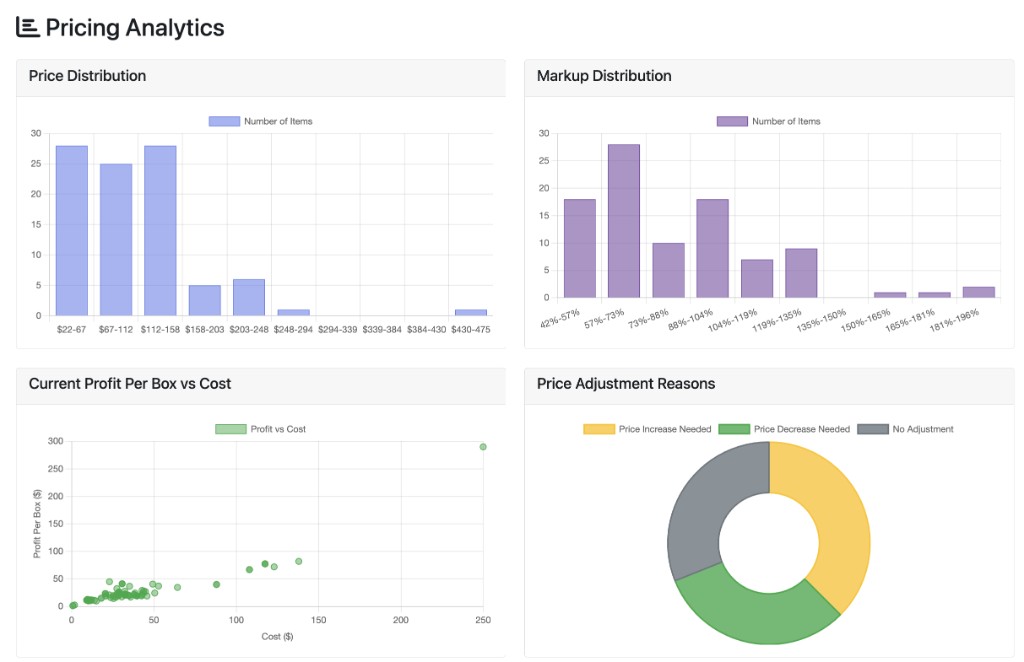
Example of the Charts view after you run your file—see how prices and markups spread, how profit relates to cost, and why items were adjusted.
You also get line-by-line suggested prices for your catalog from your costs, margins, and inventory—so you spend minutes, not hours, in spreadsheets. Built for food wholesale, import, and distribution.
Steps
Settings — Margins and rules (defaults are fine to start).
Template — Download, add your rows.
Upload — Validate and run.
Price — The tool picks a base price from markup vs. profit-per-box / lb / volume (whichever needs the highest price), then adjusts for stock velocity, competition, and clearance flags.
Results — Review, export Excel, open Charts for the big picture.
Results columns
Column
Meaning
Suggested Price
Recommended sell price.
Local Price
Price after your local discount (e.g. regional accounts).
Current Price
From your file.
Price Change
Vs. current. Yellow = increase.
Markup %
Margin check on cost.
Profit per Box
Profit per case.
Holding Cost/Day
Storage cost signal (bulky items).
Status
Why the price moved (demand, competition, expiry, etc.).
Tip: Yellow rows often mean hot items or tight stock; green-tinted decreases usually mean slow or heavy inventory. See Charts for patterns.
Upload a file and open Results first — charts appear here.
Premium Analytics
Advanced pricing insights and strategic recommendations
Current vs Suggested Price
Price Change Magnitude
Inventory Age vs Profitability
Volume Efficiency Analysis
Sales Velocity Heatmap
Competitive Impact Analysis
ROI Distribution Analysis
Run an upload and view results to load premium analytics.
Settings
Margins, discounts, and inventory rules used for every upload.
At a glance
These numbers set your margins and rules. The calculator uses the highest price needed to satisfy markup and profit targets. Click beside a field for typical ranges.
Markup & profit
to
to
to
to
Local & market
0.90 = 10% off local price
0.20 = up to ±20% from stock & sales
Sales & stock
Cases/mo = “fast”
Cases/mo = “slow”
Units = “low stock”
Units = “high stock”
0.85 = 15% off slow movers
Warehouse & expiry
$/cu.ft./day
0.70 = 30% off expiring
Excel template
Required columns
Item — SKU / ID
Description — Name
Cost — Per case
Weight (lb) — Per case
Volume (CBF) — Cu. ft. per case
Quantity On Hand — On hand
Price — Current sell price (comparison)
Optional
Competitive Pricing Factor — 1 = no change; 0.9 = 10% off vs. competition